For CA, tax and audit firms

Audit and compliance, scaled 20X. Keep the team you have.

Client data pulled in automatically. No more chasing clients for it.

  • $1 per client, per month
  • Free for 1 month, up to 10 clients
  • 20 languages, 168 display currencies
  • Client data never copied
Before and after

Stop chasing data. Start the audit.

Three operators in your firm phone four clients for their data. Files come back slowly over WhatsApp, as sheets and as Tally company backups, with pieces missing.Your FirmChasing dataClient AClient BClient CClient DSend your dataBank statement?Still waiting...OperatorOperatorOperatorWhatsAppTally company?MissingSheets
Before

Today: you chase the data

  1. Ask
  2. Wait
  3. Chase what's missing
  4. Match it up
  5. Ask again
  6. Put it together
  7. Only thenAudit & compliance
Time before the audit starts Weeks

Weeks of back and forth before the real work starts.

All your connected clients send their books to your firm on their own over the Balaaji network. Audit tasks arrive on a rail inside your firm and each of the three operators picks one up.Your FirmAuditingYour ClientsAlways connectedAutomaticall day, every dayOperatorOperatorOperator
With Balaaji

With Balaaji: the data comes to you

  1. Client books flow in on their own, all the time
  2. On demandGST returnsBalance SheetProfit & LossLedgers & stock
  3. Straight to audit & compliance1Task Engine2Operator assignment3Completion
Time before the audit starts 20X faster

Straight to audit & compliance. 20X faster.

How Balaaji works

Connect. Collect. Organise. Execute. Scale.

  1. Step 1

    Connect

    Clients on TallyPrime, Fusion or Billy link to your firm by pasting one key.

    See how onboarding works
  2. Step 2

    Collect

    Every client's bills reach one firm screen, read live from their books and never copied.

    See how you collect data
  3. Step 3

    Organise

    One task goes to a whole client group, each client with an owner and a deadline.

  4. Step 4

    Execute

    Each person works their client items in My Tasks: Pending, In progress, Completed. Overdue items stand out, and the partner sees progress live.

  5. Step 5

    Scale

    Your client list climbs from 20 to 1,000. Your team stays the same.

The growth bottleneck

Grow from 20 clients to 1,000 without hiring.

Every new batch of clients usually means more people to chase books and track deadlines. So firms turn work away, or burn out their team.

Without Balaaji

  • Every new batch of clients means hiring and training more staff.
  • Books sit in each client's software. You see them when the files arrive.
  • Deadlines live in spreadsheets and chat groups.
  • The partner finds problems at month end.

With Balaaji

  • The same team keeps up as the client list grows.
  • Every client's books, live on one screen.
  • One task pushed to a whole client group at once.
  • Each person's workload and every client's status, in view all day.

How you scale with Balaaji

  1. Add capacity in a few clicks

    Pick a bigger plan under Settings. It applies as soon as your payment is confirmed.

  2. Import clients in batches

    Load clients from Excel, send each one its key, and watch them connect.

  3. One task, a whole group

    Create GSTR-3B once for every monthly filer, then give each client to a person.

  4. Watch the whole firm live

    Dashboard, task board, who is working and every client's status, on one screen.

app.balaaji.ca · Task board
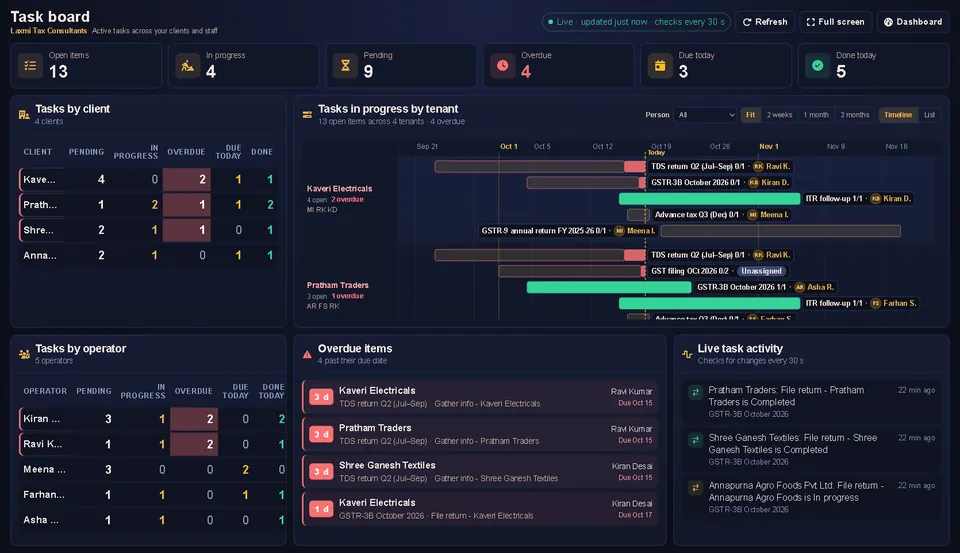
Task board with open, in progress, overdue, due today and done today counts, tasks by client and tasks by operator
app.balaaji.ca · Tasks
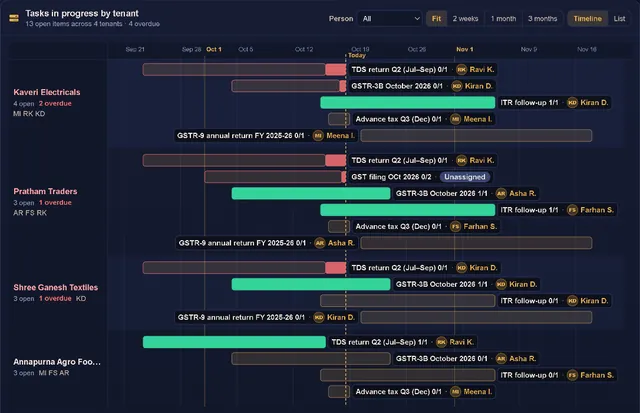
Timeline of filings per client, such as TDS return Q2 and GSTR-3B October, each with the staff member assigned
app.balaaji.ca · Dashboard
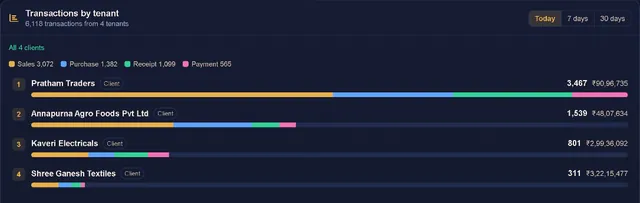
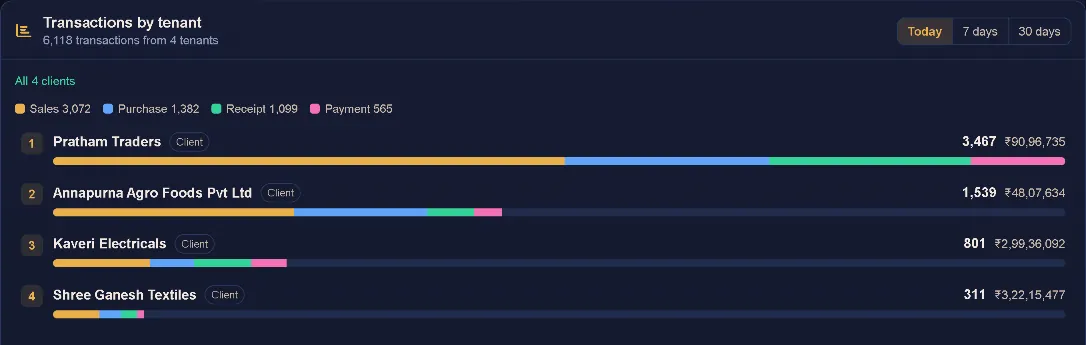
Transactions by client today, each bar split into sales, purchase, receipt and payment, with totals in rupees
Plans & pricing

Priced by how many clients you manage

$1 per client, per month, and less on larger plans.

Trial (1 month)
Free

Up to 10 clients, free for 1 month. Full access with no restrictions: try everything Balaaji offers.

Start the trial
Mini
$25/month

Up to 25 clients for $25 a month, that is $1.00 per client. Standard, Heavy, Enterprise and Mammoth plans cover up to 500 clients.

Start now
Giga
Custom

More than 500 clients? A custom plan built around your firm. Talk to us for a quote.

Talk to us
  • No setup fee
  • Billed in your currency, INR by default
  • Move up a plan in a few clicks
Step 2 · Collect

Collect your clients' data without chasing them.

No emails, WhatsApp photos or spreadsheets. Once a client connects, every bill is there, live from their books.

  1. 1Choose a client

    Pick any connected client from the list.

  2. 2Filter by type and date

    Sales, purchase, receipt, payment, journal and more, for a day or a date range, with search.

  3. 3Open the bill

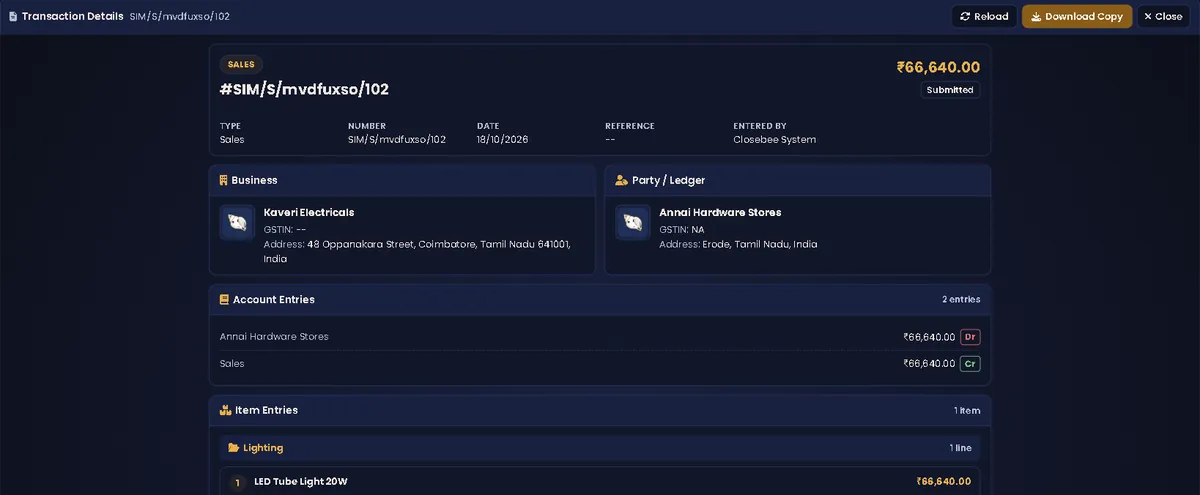
    Party, GSTIN and address, amount, status, who entered it, the account entries and item lines. Download a copy as an image.

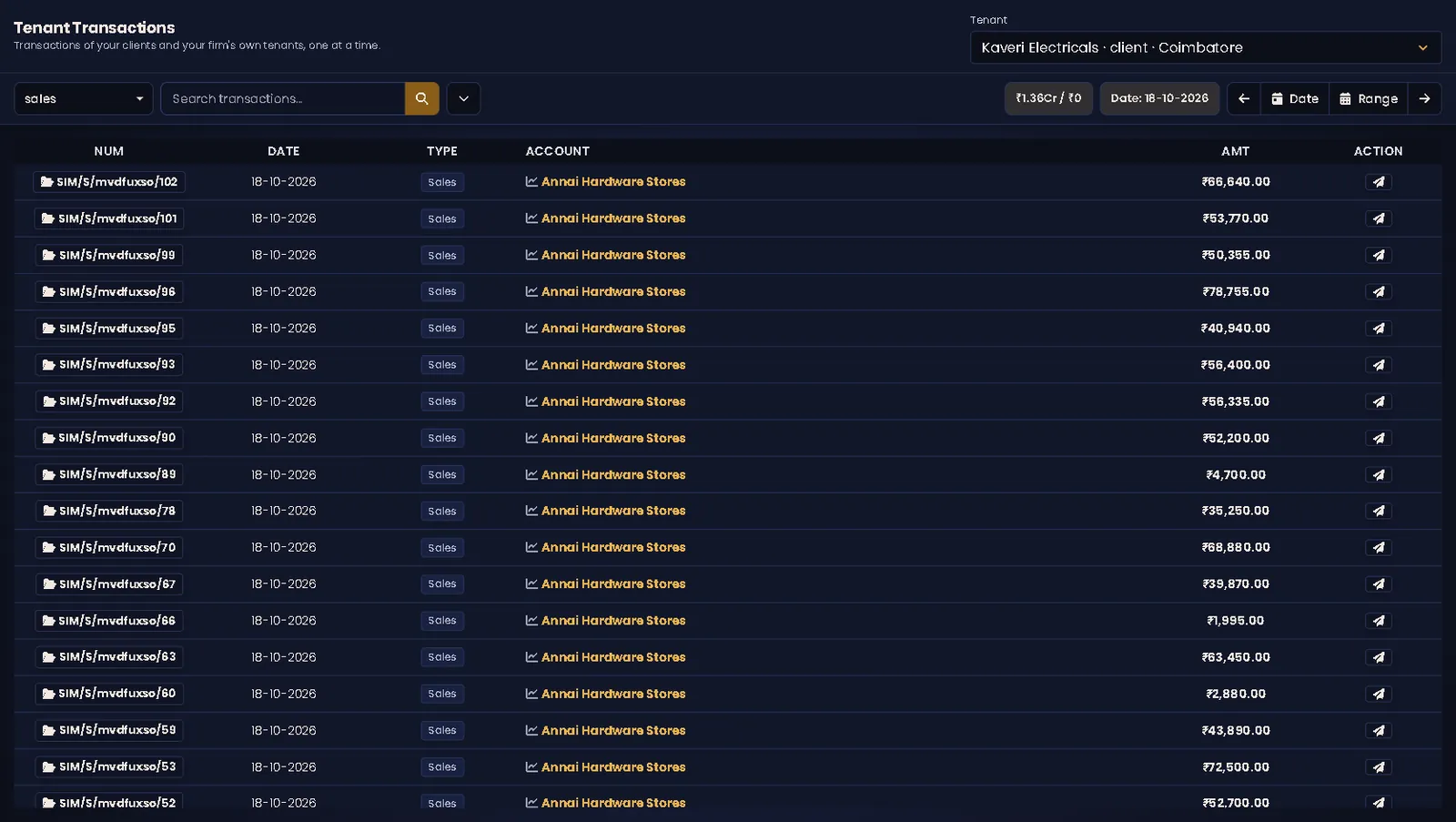
app.balaaji.ca · Tenant Transactions
Tenant Transactions showing one client's accounting books, Kaveri Electricals, filtered to sales on one date: each bill with its number, date, type, party account and amount in rupees, with day, date and range controls and a search box
Transaction details for one sales bill: amount, status Submitted, type, number, date, reference and entered by, the business and the party with GSTIN and address, the debit and credit account entries, and the item line, with Reload and Download Copy buttons
See every client, live

Know what your clients posted today, before they tell you.

Sales, purchases, receipts and payments reach your dashboard the moment a client records them.

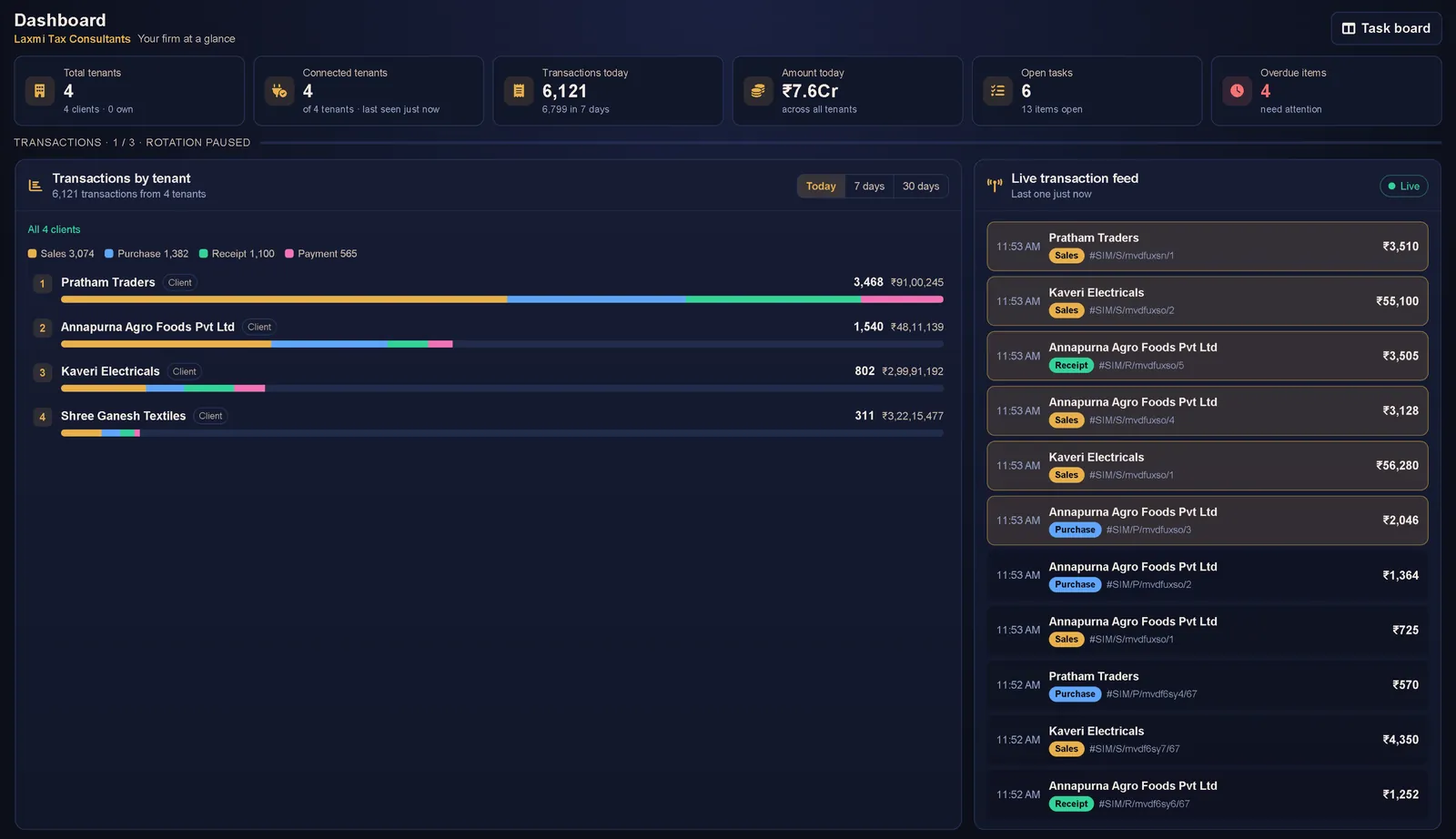
  • Key figures at a glance: clients, connected clients, transactions and amount today, open tasks and overdue items.
  • A live feed of every new entry, with a bell if you want one.
  • Activity by client for today, 7 days or 30 days, split into sales, purchase, receipt and payment.
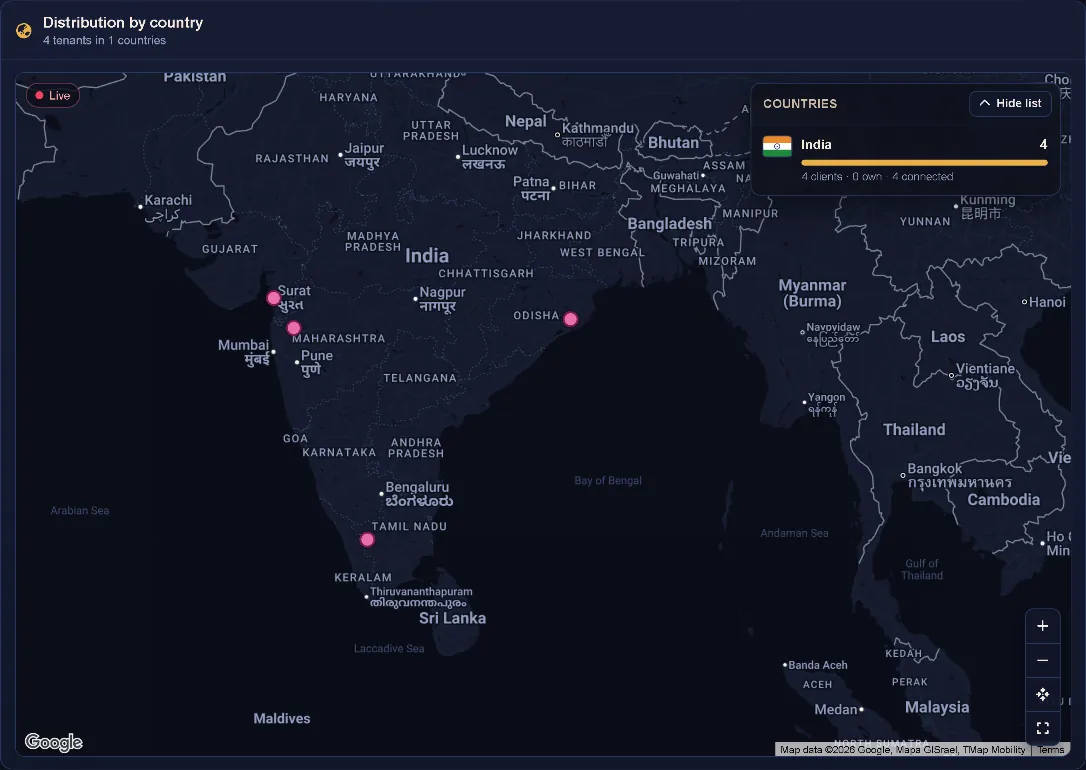
  • A map of where your clients do business.
app.balaaji.ca · Dashboard
Distribution by country map of India with a pin for each connected client and a country list showing four connected clients in India
Transactions by client for today: four client businesses ranked by transaction count, each bar split into sales, purchase, receipt and payment, with totals in rupees
On the office screen

Put the whole firm on the wall.

Full screen on a TV or touch screen, with pages that turn on their own.

The Balaaji firm dashboard full screen: key figures for clients, connected clients, transactions today, amount today, open tasks and overdue items, transactions by client and the live transaction feed
Never miss a deadline

Every filing gets an owner, a due date and a status.

Set up GSTR-3B for September once, for every client who needs it, and watch it move.

  • Built the way firms work: one task to collect client information, another to submit the filing, each with its own responsible person.
  • Add one client or a whole group, say every monthly GST filer, in one step.
  • Each client gets its own row and its own staff member, so progress is never a guess.
  • Overdue work stands out on the dashboard, long before the client calls.
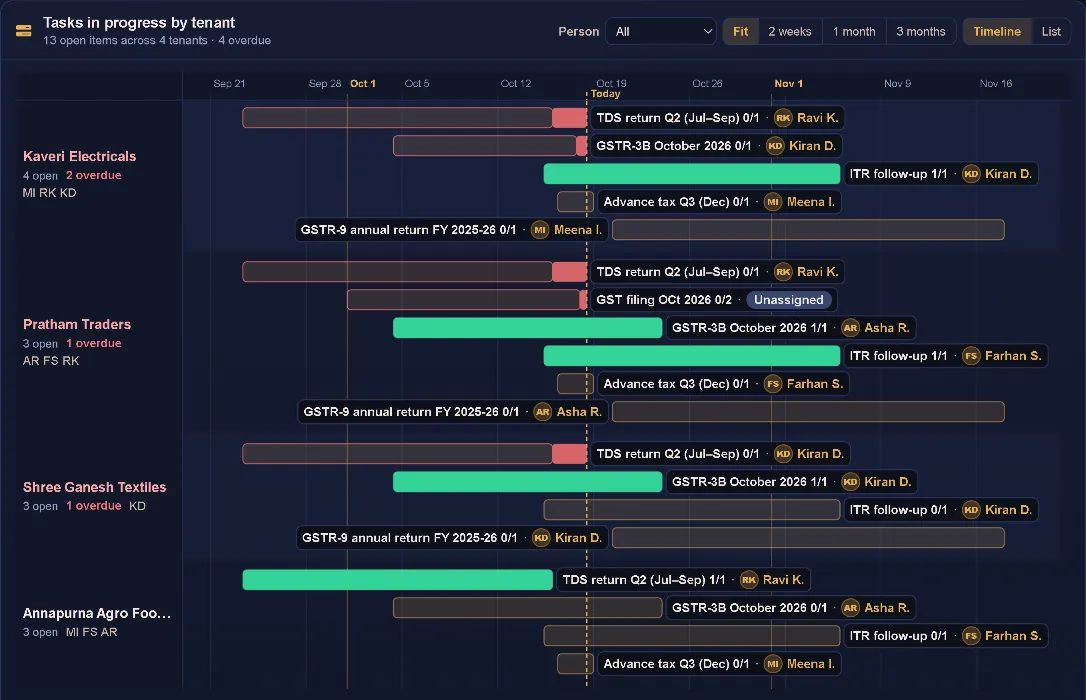
app.balaaji.ca · Tasks
Tasks in progress by client on a timeline: TDS return Q2, GSTR-3B October, ITR follow-up, advance tax Q3 and GSTR-9 annual return for each client, with the staff member on each item and overdue items in red
Run the team like a firm

Partners see the whole firm. Staff see their own desk.

Give each person the right access, hand out the work, and see the workload live.

  • Roles for administrators, operators and viewers. Operators are the people you assign filing work to.
  • My Tasks shows each person only what is on their plate.
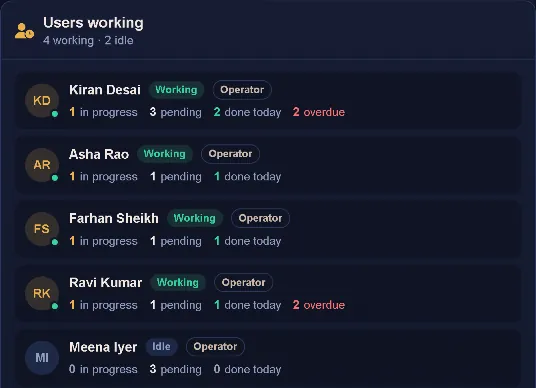
  • Users working shows who is busy and who is free, with each person's in-progress, pending, done-today and overdue counts.
  • A live task board made for the wall of your office.
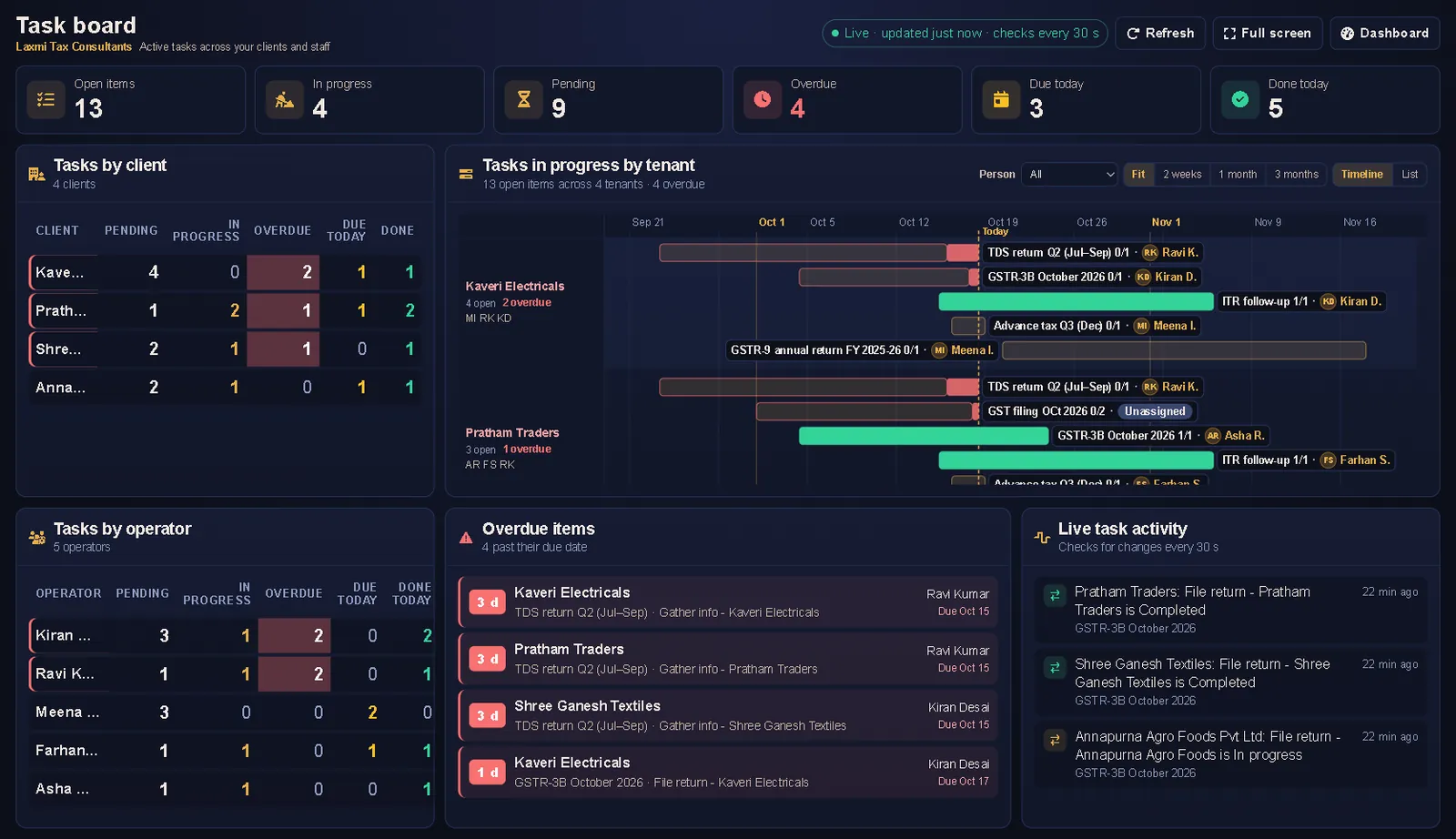
app.balaaji.ca · Task board
Task board with open, in progress, pending, overdue, due today and done today counts, tasks by client, tasks by operator, overdue items and live task activity
Users working panel: five operators, four working and one idle, with in progress, pending, done today and overdue counts for each
Privacy by design

Your clients' books stay with your clients.

Balaaji does not copy client ledgers, stock items or vouchers into your firm. When you look, the figures are read live from each client's own books.

Not copied

Client masters and transactions are never stored in your firm's books.

Read in place

Dashboards and transaction views read straight from the client's own books.

The client connects

A client appears in your list only after they connect with the key you send them.

You keep only yours

Your firm holds its own books, client links, licences and the invoices it raises.

Built for firms everywhere

Your language. Your currency.

Each person picks one of 20 interface languages. Arabic, Hebrew and Urdu switch the layout to right to left.

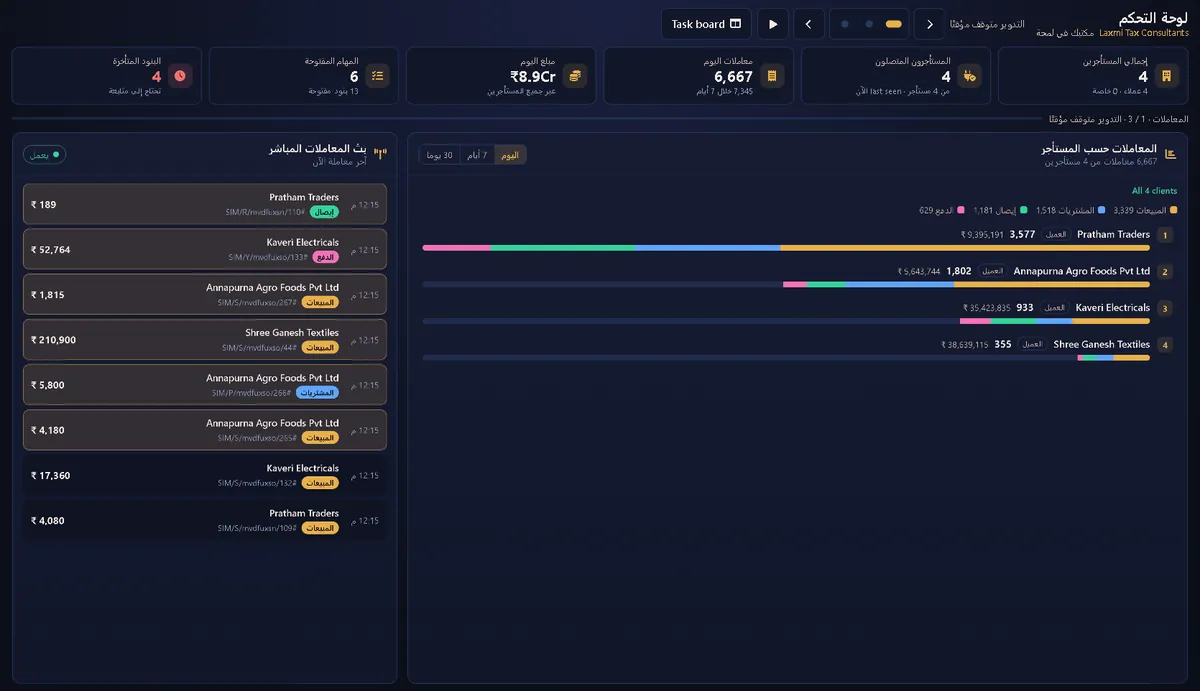
app.balaaji.ca · Dashboard
The Balaaji dashboard in Arabic, laid out right to left, with key figures, transactions by client and the live transaction feed
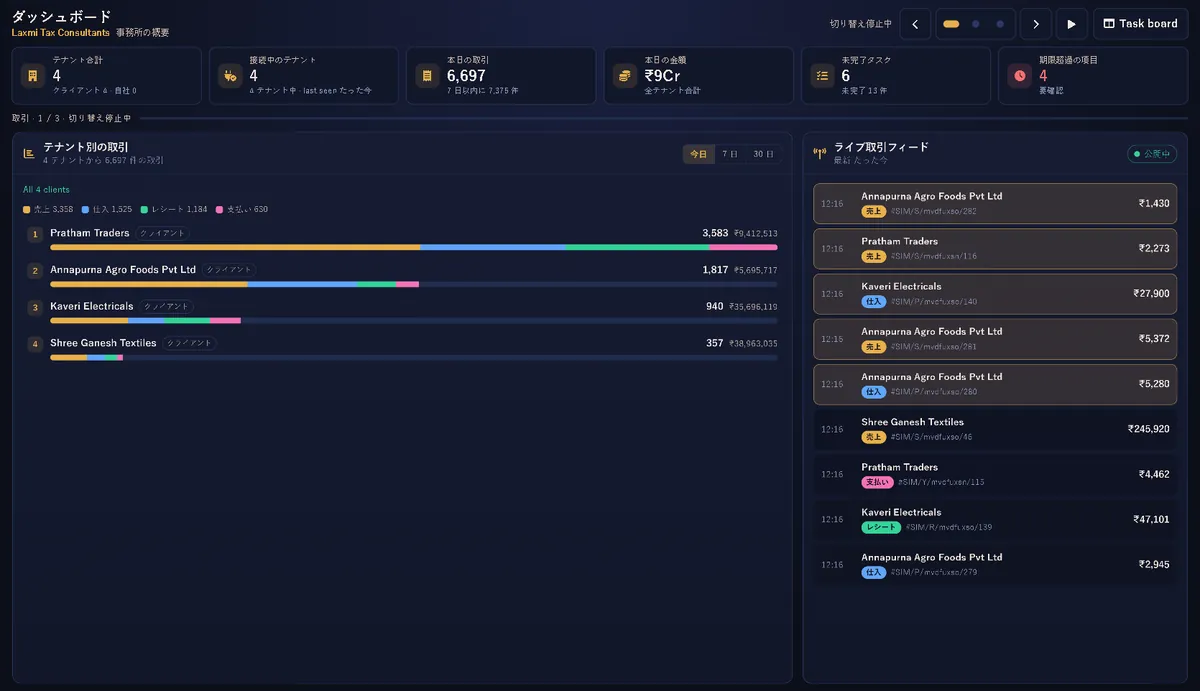
The Balaaji dashboard in Japanese, with key figures, transactions by client and the live transaction feed
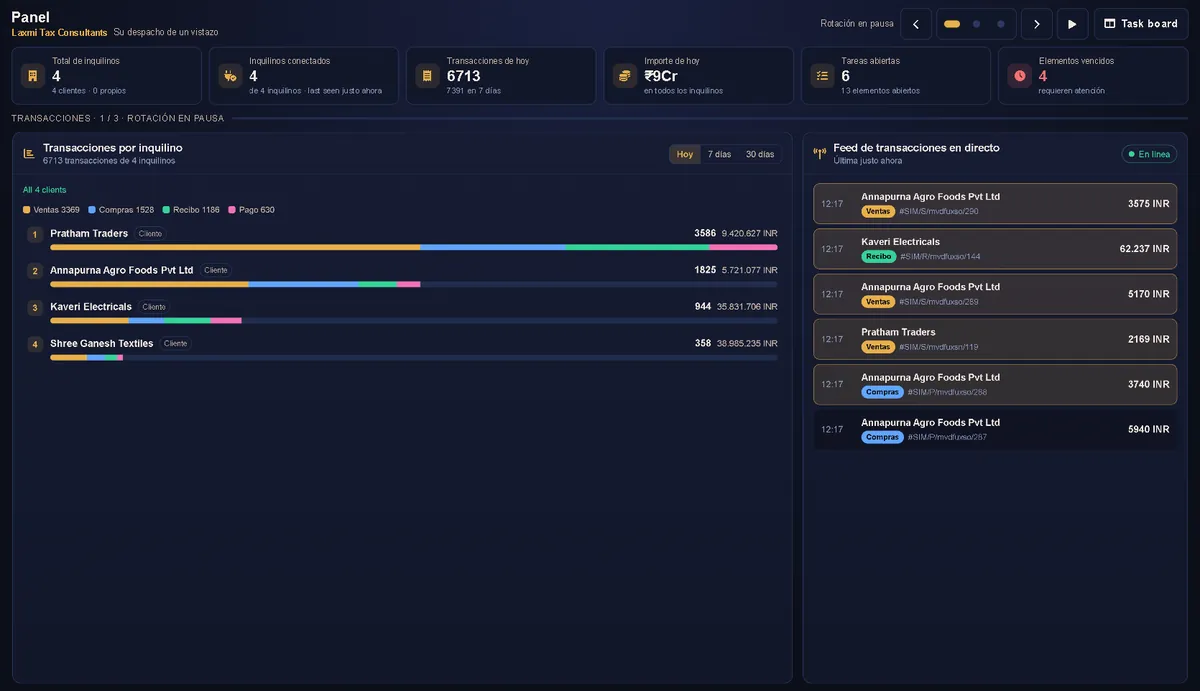
The Balaaji dashboard in Spanish, with key figures, transactions by client and the live transaction feed
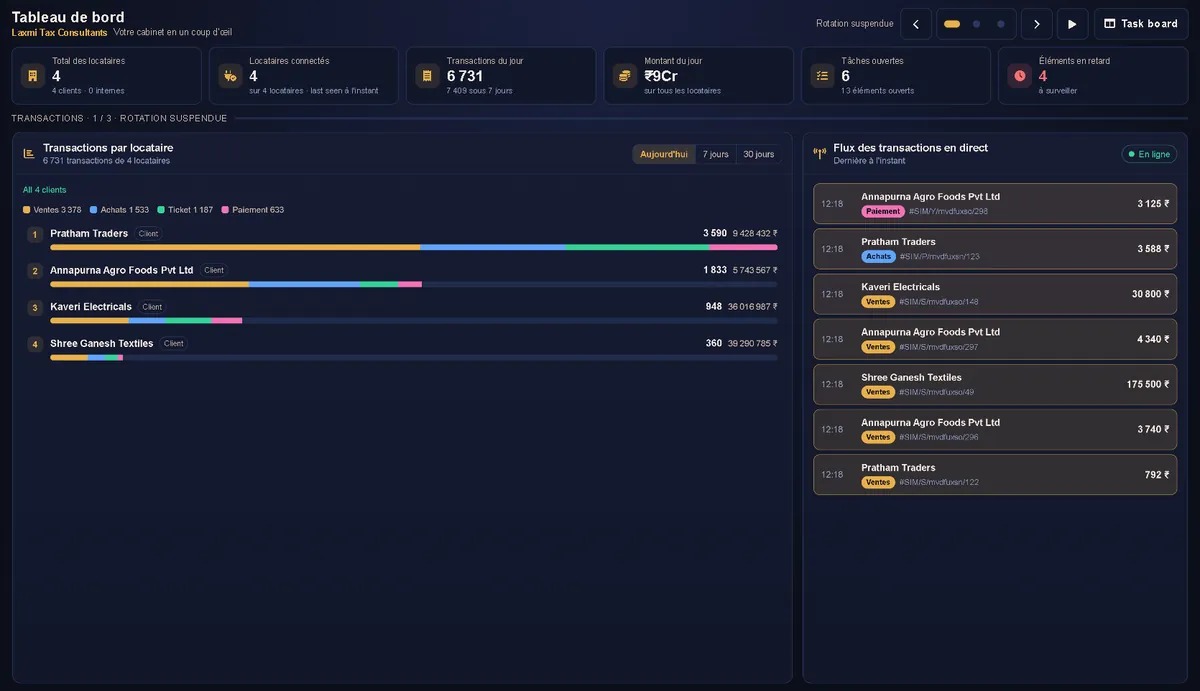
The Balaaji dashboard in French, with key figures, transactions by client and the live transaction feed

20 interface languages

  • English
  • 简体中文
  • Deutsch
  • 日本語
  • Français
  • Italiano
  • Português (Brasil)
  • Português (Portugal)
  • Русский
  • Español
  • 한국어
  • Bahasa Indonesia
  • Nederlands
  • العربية
  • Polski
  • Svenska
  • עברית
  • ไทย
  • Tiếng Việt
  • اردو

Your display currency

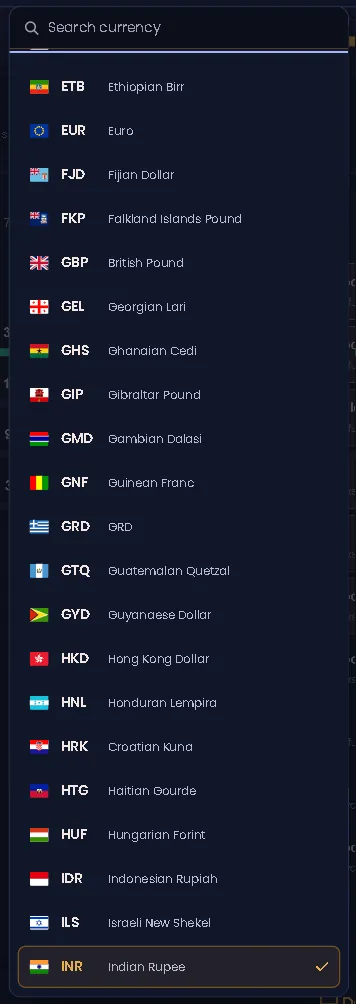
An administrator picks it from 168 currencies, INR by default, and plan prices and payments are converted into it. Client amounts stay in each client's own currency.

Ease of onboarding

A key, a paste, and they're live.

Your client pastes one key into the app they already use. That's their whole part.

  1. Step 1

    Create a key

    Add a client, or a batch from Excel. Balaaji makes its licence key.

  2. Step 2

    Send it

    Copy the key, or share it on WhatsApp in one tap.

  3. Step 3

    The client connects

    They paste it in Fusion (Connect › Balaaji) or on the TallyPlug licence screen for TallyPrime, then press Connect.

  4. Step 4

    You see their data

    The client appears in your list, and their bills come in live.

    See their bills in Tenant Transactions
  • Load clients in batches from Excel, up to 25 per file.
  • Optional: incoming client transactions post to your own TallyPrime.
  • Keep a list of your services and raise invoices to clients.
Works with

The software your clients already use.

TallyPrimeThe client connects with the key you send, through our TallyPlug desktop connector.
FusionThe client pastes your key under Connect > Balaaji.
BillyProvision clients who keep their books in Billy.
Your firm's TallyPrimeOptional: post incoming client transactions to your own TallyPrime automatically.
Free for 1 month

Ready to take on 1,000 clients with the team you have?

Start now. Try Balaaji free for 1 month with up to 10 clients. Then $1 per client, per month.